
How do I avoid delivering the wrong mix version?
Deliver through one Soneam review link. Check the approved version before release: downloads follow the current version, not a fixed approved version.
Use the Soneam review link for delivery rather than attaching each revision to an email. The client downloads the files you have released from that page. For each song selected in Delivery, the download follows its current version.
Approval does not lock the delivery to that version. If the client approved v2 and you then make v3 current, the released download changes to v3, even if v3 has not been approved. The approval record still refers to v2.
-
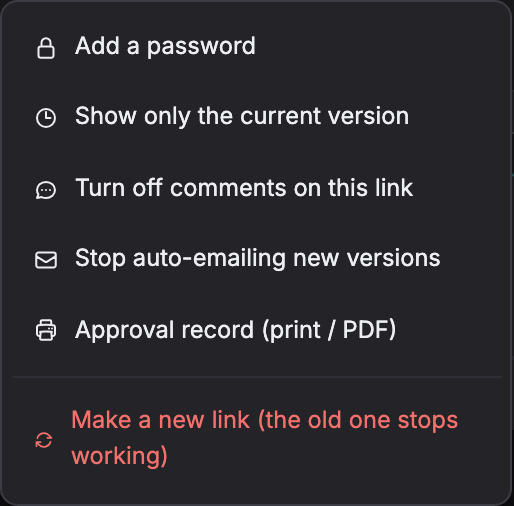
Open the approval record from the review-link menu and check which version of each song the client approved.
-
Check that each song’s current version is the one you intend to deliver. If needed, select the approved version and use its menu to make it current.
-
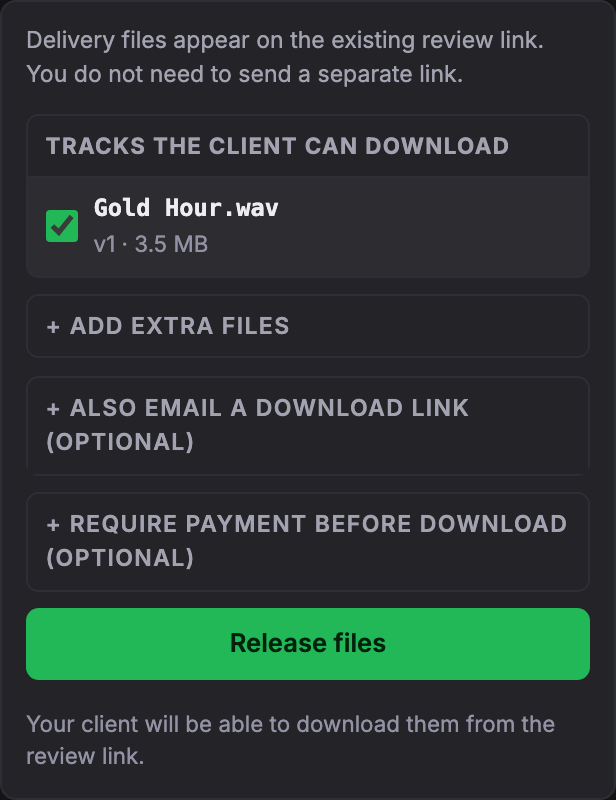
Open Delivery. Check the selected songs, any extra files and the payment settings, then press Release files. Send the review link and ask the client to download the final files there.
-
If you need to revise a released song and want to wait for fresh approval, press Unrelease before uploading or making another version current. Check the new approval and delivery contents before releasing again.
Checking a downloaded file
Compare the downloaded file’s SHA-256 checksum with the checksum for that version in the approval record. A match confirms the file is identical to the approved file. It does not prevent a different version from being released.
On macOS, open Terminal and type shasum -a 256 with a trailing space, drag the downloaded file into the window and press Return. On Windows, run Get-FileHash -Algorithm SHA256 -LiteralPath "C:\path\mix.wav" in PowerShell, replacing the example path with your file’s path. Compare the full hash with the approval record; letter case does not matter.
Unrelease blocks new download requests through the review link. It does not cancel a transfer already in progress; a download URL issued just before you unrelease may also remain usable briefly. Files already downloaded or sent as email attachments cannot be recalled.
On Free, released downloads are available for 30 days at a time. You can make them available again from Delivery. See delivery and payment settings before sharing the link.
Try it in Soneam
Explore the client review page. To try approval and delivery with your own mix, create a free account; the public demo does not accept approvals.
You need a free account to upload a mix. Your clients do not need one to listen or comment.
Not covered here? Write to support@soneam.com.