
Client feedback, approval and file delivery for mixing engineers
Send your client one link. They listen to a lossless preview, leave notes at the exact second, and approve a specific version. Then release the final WAVs and stems on the same link, locked until you are paid: confirm a bank transfer with one click on any plan, or let a card payment unlock them automatically on Pro. No client account.
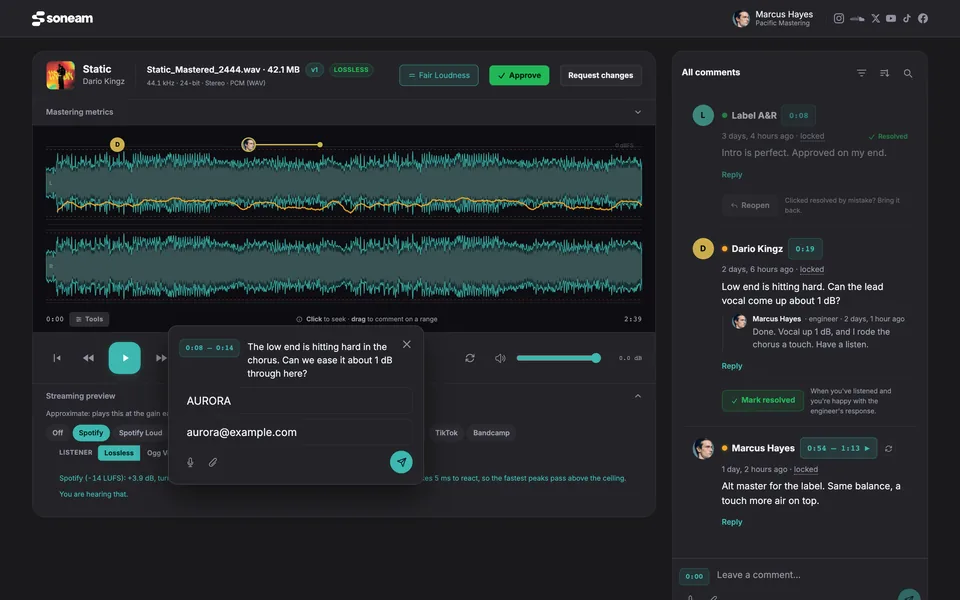
How a mix job runs
- Upload the mix. The project gets one review link; paste it into the chat you already use with the client, or email it from Soneam.
- The client listens in any browser and leaves notes at a point or across a range of the waveform.
- You work through the notes and mark each one done, then upload the revision to the same track. The link plays the new version.
- The client approves a specific version. Soneam records who approved it, when, and the file’s checksum.
- You set the balance and release the final WAVs and stems on the same link.
- The client pays by transfer and you unlock the files with one click, or, on Pro, pays by card and the files unlock on their own.
Timestamped notes and a revision checklist
Notes sit on the waveform at the second they refer to, so “the vocal at 2:14” arrives as a mark at 2:14, not as a line in an email. The client can reply in a thread, record a voice note in the browser or attach a file. Each note has a status: open, in progress or resolved. Mark notes resolved as you work through a revision, and the Comments panel shows what is still open across the whole project. Notes that are still open carry over to the next version at the same timestamps.
Replying to a note does not resolve it, so a question you asked does not disappear before the client answers. When the client replies, the note is open again and you get an email.
Approval is a separate step from comments
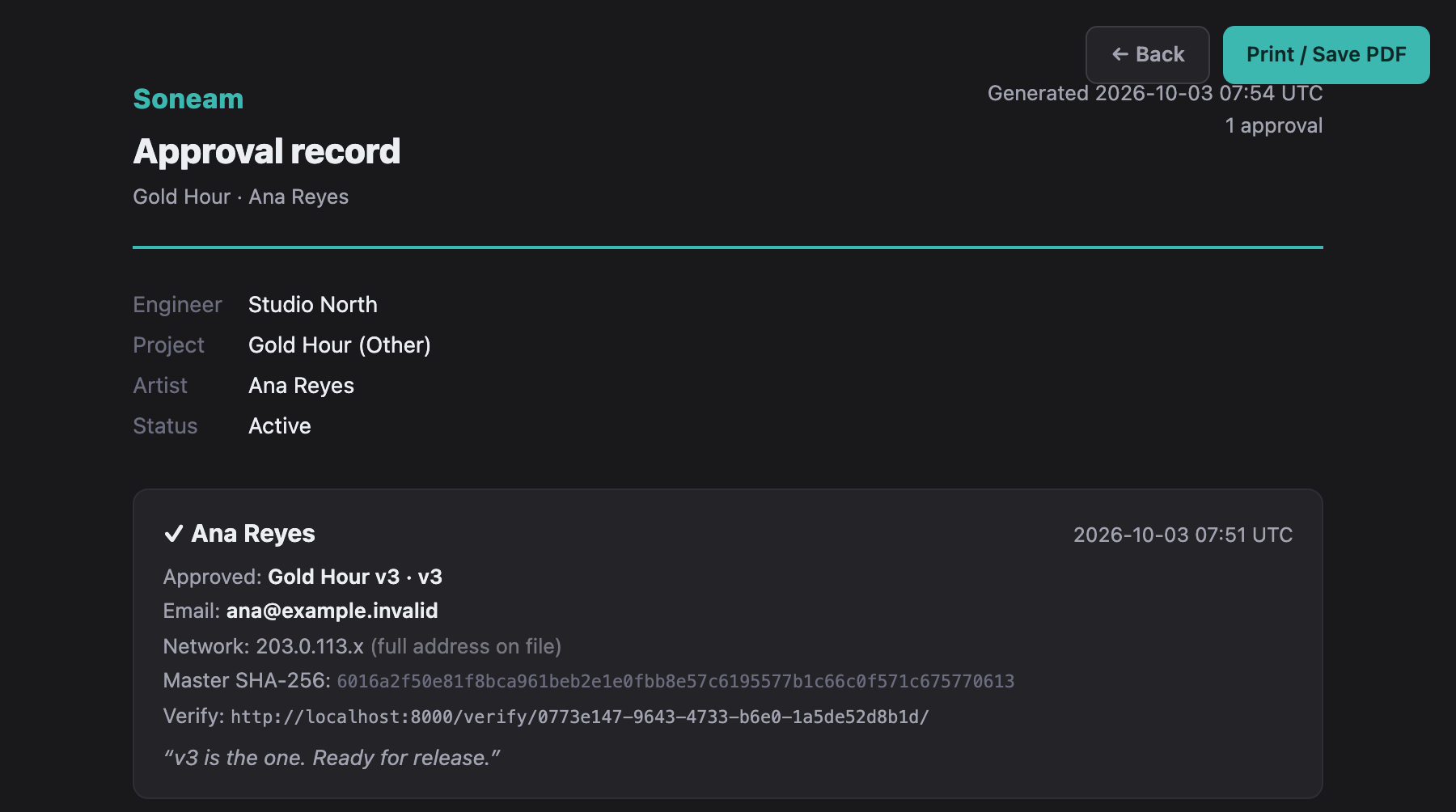
Comments are for changes. Approval is its own button, pressed on one version. The record keeps the name the reviewer typed, the time, the version and the SHA-256 checksum of that file, and you can print it. It does not verify who the reviewer is. On Pro, each approval also gets a public verification link you can send to a label or a distributor.
This matters when “sounds good” arrives in a message thread two weeks after the third bounce. The approval says which file it was. If the client approves by mistake, they can withdraw it from the review link. The approval then stops counting, and a withdrawal record keeps the version, both times and their reason. A second approval does not overwrite the first record.
The files unlock when the client pays
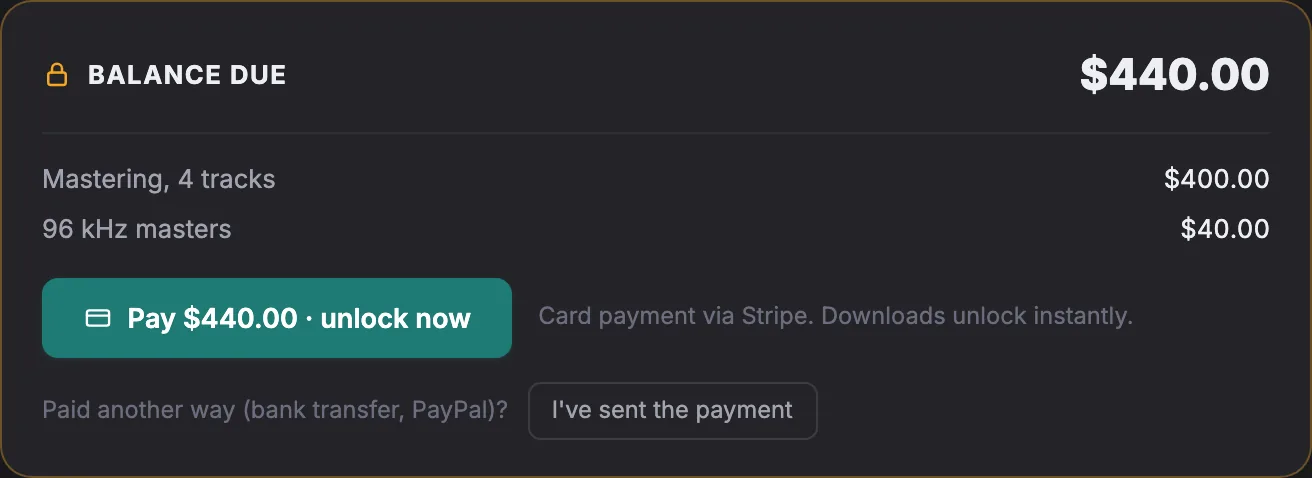
Before releasing the final files, set the balance, with line items for revision fees, alternate versions or stems. The client can keep listening and commenting, but downloads stay locked until it is paid.
- Card, on Pro and above. Connect your own Stripe account and the client pays from the delivery page. The files unlock automatically as soon as the payment clears. The money goes to your Stripe account, not through Soneam.
- Bank transfer, PayPal or anything else, on every plan including Free. Write how to pay in the delivery. When the money arrives, one click unlocks the files.
- No Soneam transaction fee. Stripe or your bank charge their own fees.
With card checkout on, you choose per delivery whether the client sees the card, the method you wrote, or both. Anyone who can play audio can record it, and Soneam does not add watermarks, so the lock protects the files rather than the sound. Deliveries can be charged in USD, EUR, GBP or JPY.
Release the originals on the same link
Release the tracks and add stems, instrumentals or a session archive as additional files. The client downloads the file you uploaded, not a re-encode, and each file is listed with its SHA-256 checksum so they can check it arrived intact. Everything can be saved as one ZIP. A released track follows its current version, so check the release whenever you upload a change.
Collect the session from the client
Send an upload link and the client drops their stems, references or a zipped session into it, without an account, up to 50 GB per file. The files appear in the project. Files a client sends do not count toward the Free plan’s monthly upload allowance; they do count toward storage.
Compare revisions at matched loudness
Every version is measured for integrated LUFS and true peak. On the review page, the client can preview roughly how Spotify, Apple Music, YouTube and other services would turn the mix up or down, and Fair Loudness plays two versions at the same level so the louder bounce does not win by volume alone. These previews are approximations; actual playback depends on the service and the device.
Plans
Free has 5 GB of storage, 1 GB of your own uploads a month and up to 3 versions per track, with no time limit and no card needed. On Free a release stays up for 30 days at a time and can be put back with one click. Pro, at $8 a month billed yearly, has 500 GB, no upload limit, unlimited versions, card checkout on deliveries, your logo on the client pages and the Visits panel. Clients never pay for Soneam or sign up. See pricing.
What Soneam does not do
It does not open your session, sync with a DAW in real time, review video, add watermarks, or hold money for you. Comments can be exported as DAW markers on Pro. The Filepass comparison and the other comparisons set it against similar tools.
Frequently asked questions
Can the client download the mix before paying?
Not if you set a balance before you release the files. The client can keep listening and commenting on the review page, but downloads stay locked until the card payment clears or you confirm the payment. Anyone who can play audio can also record it, and Soneam does not add watermarks.
Do clients need an account?
No. They open the link in any browser, phone included, to listen, comment, approve, upload files and pay. There is nothing to install.
Can I take PayPal or a bank transfer instead of a card?
Yes. Write how to pay in the delivery, for example your bank details or a PayPal link. When the money arrives, one click unlocks the files. On Pro, with card checkout on, you can also choose card only, or no card at all, for each delivery.
What if the client approves the wrong version?
The record names the version they approved, so you can see it straight away. The reviewer can withdraw it from the review link. The approval then stops counting, a withdrawal record keeps who had approved which version, when they approved, when they withdrew and their reason, and you are told. A second approval does not overwrite the first record.
Which plan do I need to take card payments?
Card checkout through your own Stripe account, with the files unlocking automatically, is on Pro and above. The payment lock and manual confirmation of a bank transfer or PayPal payment are on every plan, including Free. Soneam takes no transaction fee; Stripe charges its processing fees.

Try it on your next mix
Upload a mix, open its review link the way a client would, and leave yourself a note before you send it. No card is needed for the Free plan.