
Mix feedback, approval and stem delivery for music producers
Send your artist one link to review the beat or mix, leave timestamped feedback and approve a version. Deliver the stems as additional files, with downloads locked until any remaining balance is paid. No artist account required.
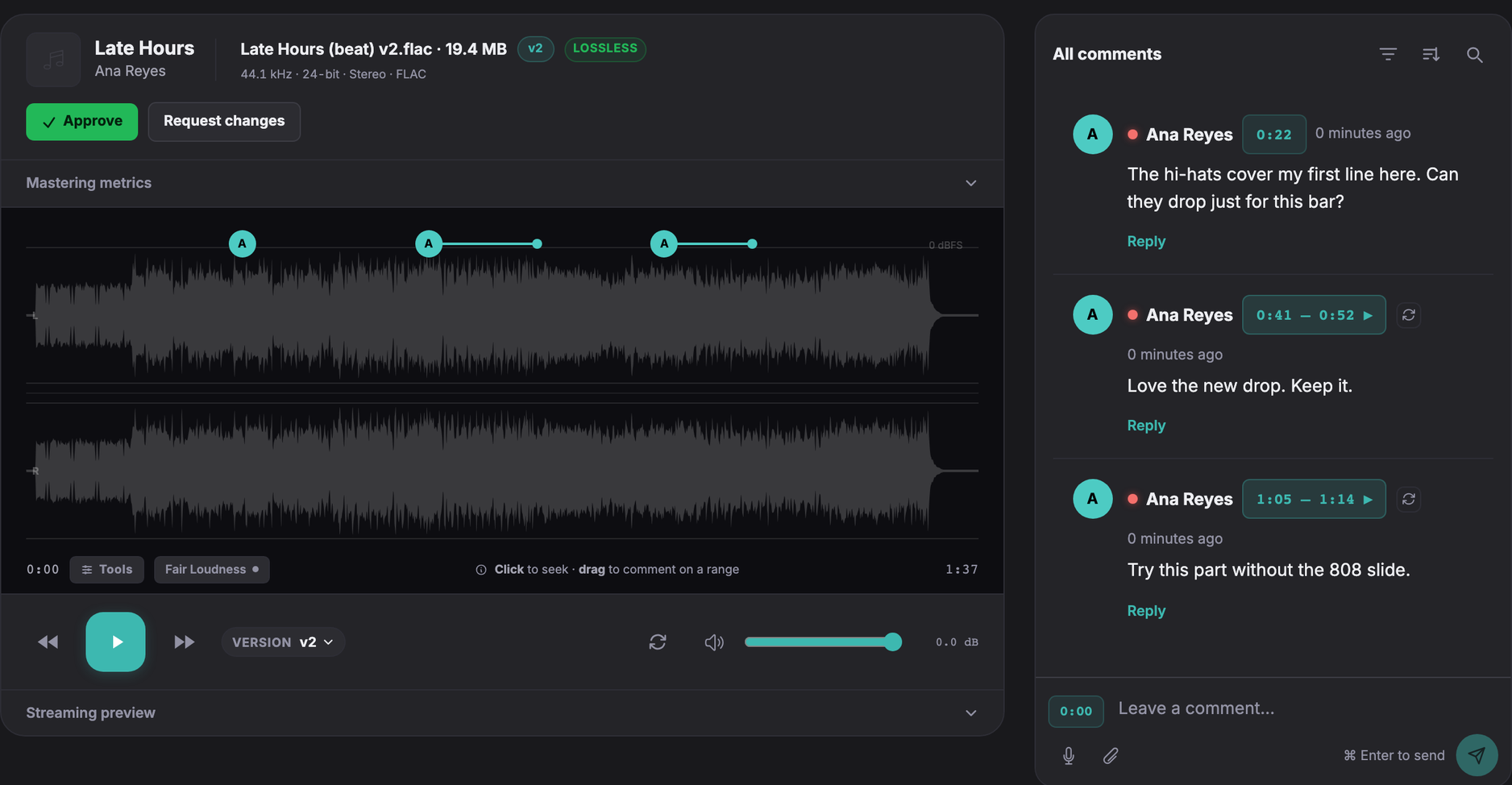
How it works
- Upload the beat or the mix and send the artist its review link.
- The artist listens in a phone or desktop browser, and leaves feedback at a time or across a range of the waveform.
- You upload the revision to the same track. The link plays the new version, and open notes carry over.
- The artist approves a specific version.
- You add any remaining balance, then release the mix and the stems for download.
When you produce around a vocal, an upload link lets the artist send you their takes the same way, without an account.
Feedback on specific passages
At 0:42 the hi-hats cover my first line, can they drop just there? From 1:58 to 2:10, try it without the 808 slide.
A note like this names a time and a change. When an artist writes that the beat feels busy, reply on the same comment and ask where. Agree before the first revision who decides the final version, especially when a manager or a label is also listening.
Send the beat or the mix
Upload the file and the project gets a review link. Paste it into the chat you already use with the artist, or send it by email from Soneam. The artist opens it in a browser and plays a lossless FLAC preview of your file. They can leave a comment at a point or drag across a range of the waveform. In this workflow, the artist reviews the beat or mix. Stems are delivered as additional files, further down.
Collect the artist’s vocals
Send an upload link. The artist drops their takes into it without making an account, and the files appear in the project. Files a client sends you do not count toward the Free plan’s monthly upload allowance; they do count toward storage.
Revise on the same link
Upload a revision as a new version of the same track. The review link plays the current version, and the artist can switch back to earlier ones unless you turn that off. Open comments carry forward at the same timestamps, so check them if the arrangement moved. Fair Loudness plays every version at the level of the quietest one, by turning the louder ones down, so a louder bounce does not win the comparison by volume alone. You can try it on two files in the free A/B tool. The Free plan keeps up to 3 versions per track.
Approval covers the mix, not the stems
When the artist is happy, they press Approve. Soneam records the name they type, the time and the exact version of the mix they approved; it does not verify who they are. The stems you deliver are separate files. They are not part of the approval, and they do not change when the mix does.
If you revise the mix after the files are out, unrelease them first. Then bounce the stems again from the same session, replace the old ones, and ask for approval of the new version before you release again. A SHA-256 checksum tells the artist that the file they downloaded is the file you released. It does not show that a stem was bounced from the approved mix.
Set the balance, then release
Before releasing the files, add any remaining balance and choose how the artist will pay. They can keep listening, but downloads stay locked until payment is confirmed. On every plan you can ask for a bank transfer or another method and unlock the files once the money arrives. On Pro and above, with your own Stripe account connected, the artist can pay by card and the files unlock when the payment succeeds. Soneam takes no transaction fee; the payment processor’s fees still apply.
Then release: tick the tracks the artist can download and add the stems as additional files. Each file is listed with a Download button and a SHA-256 checksum, and the artist can save everything as one ZIP. A released track follows its current version, so check what is released whenever you upload a change.
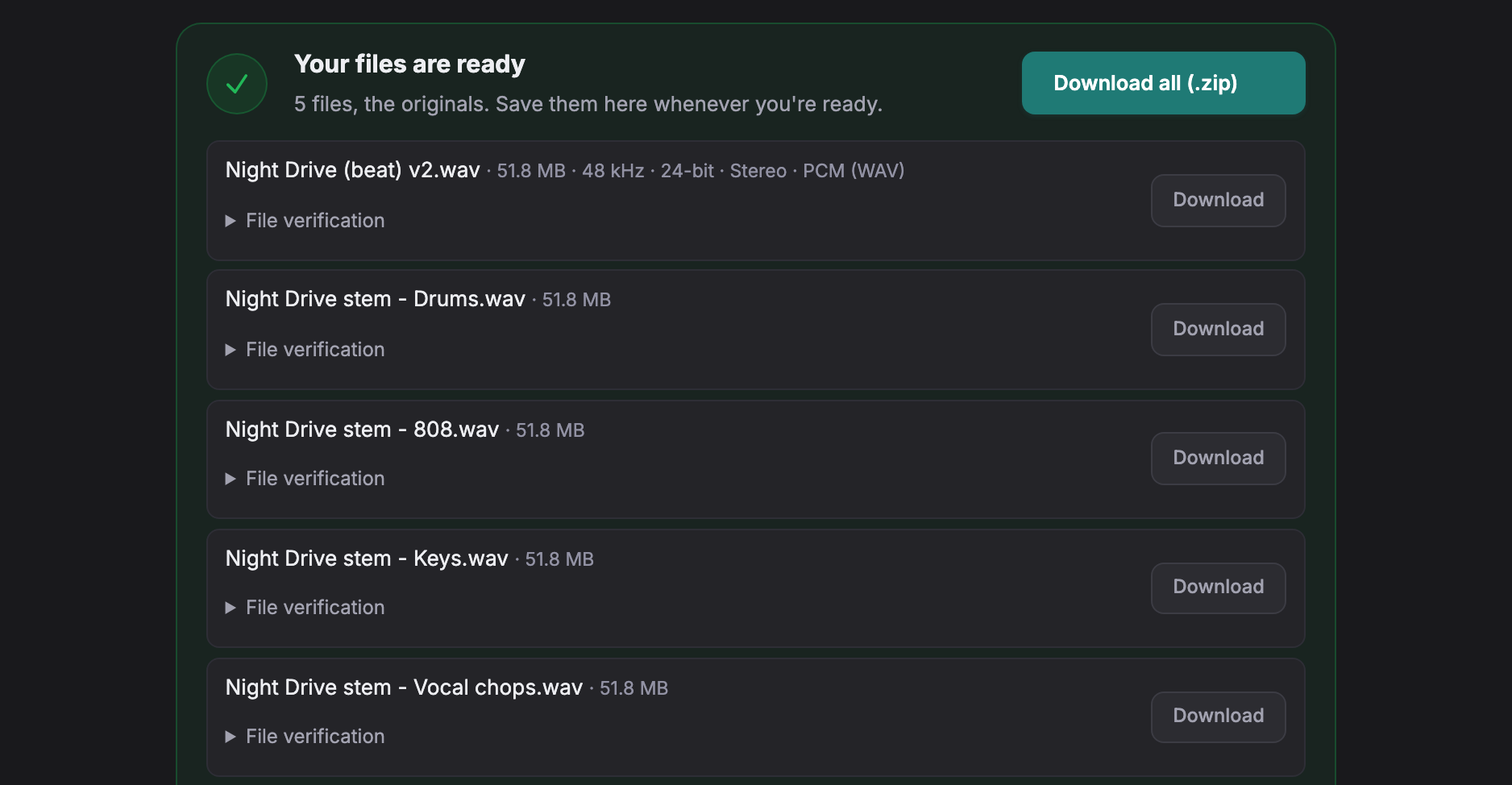
On the Free plan a release stays available for 30 days at a time and can be put back with one click. On Pro and above it stays until you unrelease it. While a balance is open the artist can still listen, and anyone who can play audio can record it; Soneam does not add watermarks. See the payment guide for the steps, and the stems guide for naming, sample rates and what to include.
How big is a stem package
A three-minute stereo stem at 24-bit and 48 kHz is about 52 MB as WAV. Twenty stems at this size total about 1.04 GB. That is more than the Free plan’s 1 GB of your own uploads a month, even before the mix and its revisions, which count toward the same allowance. The allowance does not apply during a Pro trial. Pro holds 500 GB and has no monthly upload limit. See pricing for the plans.
What Soneam does not do
It does not sell beats, issue licenses, manage contracts or collect signatures, tag BPM or key, or review video. A license or split sheet can still go to the artist as an additional file in the delivery. The comparisons set it against Samply, Filepass and others.
Frequently asked questions
Can the artist download the stems before paying?
Not if you add the balance before you release the files. The artist can keep listening on the review page, but downloads stay locked until payment is confirmed. Anyone who can play audio can also record it, and Soneam does not add watermarks.
Can the artist’s manager or label review the same track?
Yes. Everyone you send the review link to can listen, comment and approve without an account. Comments show the names reviewers type, so agree beforehand whose approval is the final one.
Do I send a new link for every revision?
No. Upload the revision as a new version of the same track. The project keeps one review link, and it plays the current version. Tell the artist when a new version is up: Soneam emails them about it only when it has their address.
Is Soneam a beat store?
No. It does not sell beats, issue licenses, manage contracts or collect signatures. It is for working with an artist you already have: feedback, revisions, approval and delivery of the files. A license or split sheet can still go out as an additional file.

Try it on one beat
Upload a beat, open its review link the way an artist would, and leave yourself a comment before you send it. No card is needed for the Free plan.