
Soneam vs Audome: review and delivery features
Compare client access, audio playback, versions, approval, payment and storage in Audome and Soneam.
Both products provide client links, audio playback, timestamped comments and version management. Compare their approval controls, playback tools, delivery settings and plans for the work you do.
Choosing what to test on an audio job
If Audome’s file organization and client pages already fit your workflow, start with the specific step you cannot complete there. Soneam is worth a trial when you need matched-loudness version comparison and a version-specific approval record. If payment-controlled delivery is essential, confirm Audome’s availability first: its pricing page marks Pro as coming soon.
At a glance
| Soneam | Audome | |
|---|---|---|
| What it is | Review, approval and delivery for finished audio | All-in-one audio collaboration and project management |
| Free plan | Yes: 5 GB and 1 GB of your own uploads a month, unlimited projects, up to 3 versions per track | No: 10-day trial, no card |
| Headline pricing | Free / $10 / $20 ($8 / $16 billed yearly) / Enterprise on request | $15/mo, or $12.50 billed yearly · Pro $59/mo |
| Clients need an account | No | No |
| Lossless playback, no login | Yes (FLAC) | Yes (up to 96 kHz / 24-bit) |
| Time-stamped comments and to-do list | Yes | Yes |
| Automatic version management | Yes | Yes |
| Password links, download on/off | Yes | Yes |
| Branding on the client page | Logo and accent color | Logo, cover image, artist and client photos, comments off |
| Client file upload, no login | Yes (50 GB per file) | Yes (no stated limit) |
| Recorded approval of a version | Yes, printable | Not documented in sources checked |
| Streaming loudness and codec preview | Yes | Not documented in sources checked |
| LUFS and true-peak metering | Yes | Not documented in sources checked |
| Checksum on delivery (SHA-256) | Yes | Not documented in sources checked |
| Payment-gated download | Yes, every plan · 0% fee | Pro is marked coming soon; payment availability needs confirmation |
| Your logo on the client page | Pro and up | Studio and up |
| Storage | 5 GB free, 500 GB or 1 TB paid | 300 GB on the plan page; FAQ says unlimited |
Use the linked product documentation to confirm plan details. “Not documented” means the sources checked did not establish the feature; it does not prove the product lacks it. Sources: Audome features, pricing and payment comparison.
What your client actually sees
The Soneam page puts comments, approval and released files alongside the player. You can add your logo and accent color to the client page.
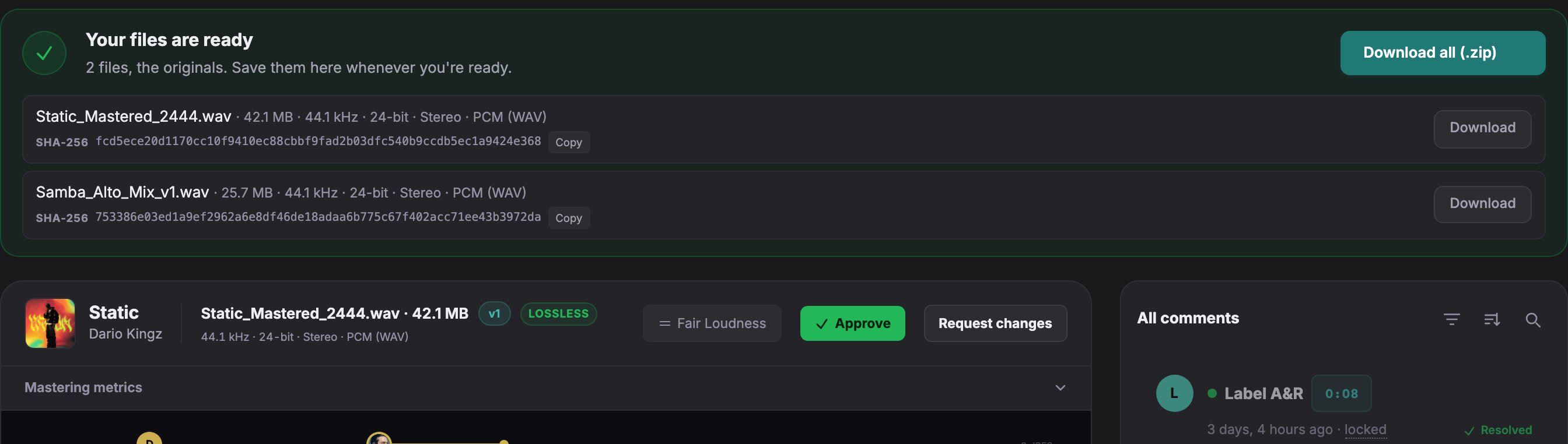
Open a live client page to try playback, comments and version comparison without an account.
Playback and normalization
Audome describes lossless playback without loudness normalization. Soneam also provides a lossless preview, with optional loudness and codec previews for comparing selected playback conditions. Those previews are simulations and do not change the original delivery file.
Checking approval and payment features
Soneam records approval of a version with supplied reviewer details and a timestamp. Audome’s public pages checked for this comparison did not document an equivalent record. Its pricing marks Pro as coming soon, while another page says payments are not integrated. Confirm current availability with Audome if this is required.
Storage and presentation
Audome lists options such as a cover image, artist and client photos, and disabling comments. Its pricing and FAQ have given different storage descriptions. Check the current allowance before choosing a plan for a large catalog. Soneam’s storage limits are listed on its pricing page.
Soneam review controls
- Loudness and codec previews. Review selected playback conditions with the client.
- Version approval. Print the record of the selected version and supplied reviewer details.
- Voice notes. Record feedback in the browser at the relevant passage.
- Client uploads. Receive files through an upload link, up to 50 GB each.
- Checksums. Compare SHA-256 values to check file integrity.
You can test these controls before choosing a paid plan. See plans and included features.
Move a copy of the current version first
Name the copied master and version so the client can identify it. Keep the original Audome project for its comments and history; uploading the file into Soneam does not import those records. Check the copied audio before sharing a replacement review link.
Free: up to 3 versions per track. Pro and above: unlimited versions within your storage allowance. Existing versions, comments, approvals and deliveries remain available. The limit applies when adding a version, including on existing projects.

Frequently asked questions
Is Soneam a good Audome alternative?
Both support client audio review and version management. Soneam includes version approval records, loudness and codec previews, payment-controlled downloads and delivery checksums on every plan. Check Audome’s current plan details for the features you need.
What does Audome do better than Soneam?
Audome offers additional client-page presentation options, including cover images and artist or client photos. Its published plans may also suit your storage needs; confirm the allowance because its pricing and FAQ have used different descriptions.
How do Soneam and Audome prices compare?
Audome lists Studio at $15 monthly or $150 yearly, and Pro at $59 monthly or $576 yearly, marked coming soon, with a 10-day trial advertised for the service. Soneam includes 5 GB on Free, with 1 GB of your own uploads a month, then 500 GB for $10 and 1 TB for $20 monthly ($8 and $16 a month billed yearly), with Enterprise on request. Confirm Audome’s current payment-feature availability if you need a paywall.

Check the review workflow
Try comments, version approval and file delivery with your own audio. Soneam’s Free plan has no time limit and requires no card.