
Soneam vs Samply: review, approval and delivery
Compare playback, version review, payment controls and file delivery in Soneam and Samply.
Both products let clients listen and comment on audio. Samply also supports payment-controlled downloads and access, so delivery and payment are shared capabilities. The useful differences are in the review controls, approval records and client experience.
When to keep Samply, and when to try Soneam
If native iPhone listening or gapless album playback is central to your reviews, those are reasons to keep Samply. Try Soneam on one job if you need the client to compare mix revisions at matched loudness, approve a named version and check the delivered file’s checksum. Payment-controlled downloads alone are not a reason to switch; both products offer them.
At a glance
| Soneam | Samply | |
|---|---|---|
| Lossless review playback | Yes (FLAC, no login) | Yes (gapless) |
| Timestamped comments | Yes, waveform-pinned, carried across versions | Yes |
| Version A/B | Yes, level-matched (Fair Loudness) | Yes, level matching |
| Streaming loudness preview in review | Yes (Spotify, Apple, YouTube, more) | Not documented in sources checked |
| Formal approval record (who/when/which version) | Yes, printable | Not documented in sources checked |
| Protected delivery (password, revoke, tracking) | Yes | Download/access controls, including paywalls |
| Checksum on delivery (SHA-256) | Yes | Not documented in sources checked |
| Non-audio deliverables (zipped DDP, stems, PDF) | Yes, on the same link, 50 GB a file | Check supported file types |
| Native mobile app | No (web + mobile web) | Yes, iOS app |
| Spatial audio preview | No | Yes (paid tier) |
| What a comment can hold | Text, a voice note, a file, or all three | Text, with bold and italic (their docs) |
| Free tier | 5 GB and 1 GB of your own uploads a month, unlimited projects, up to 3 versions per track | See current pricing |
| Headline paid plan | $10/mo or $8 billed yearly, 500 GB, unlimited projects | See current pricing |
Use the linked product documentation to confirm plan details. “Not documented” means the sources checked did not establish the feature; it does not prove the product lacks it. Sources: Samply payment settings, apps and pricing.
What your client actually sees
In Soneam, the client can review a version and then download the released files from the same page. Each delivery file has a checksum for checking the download.
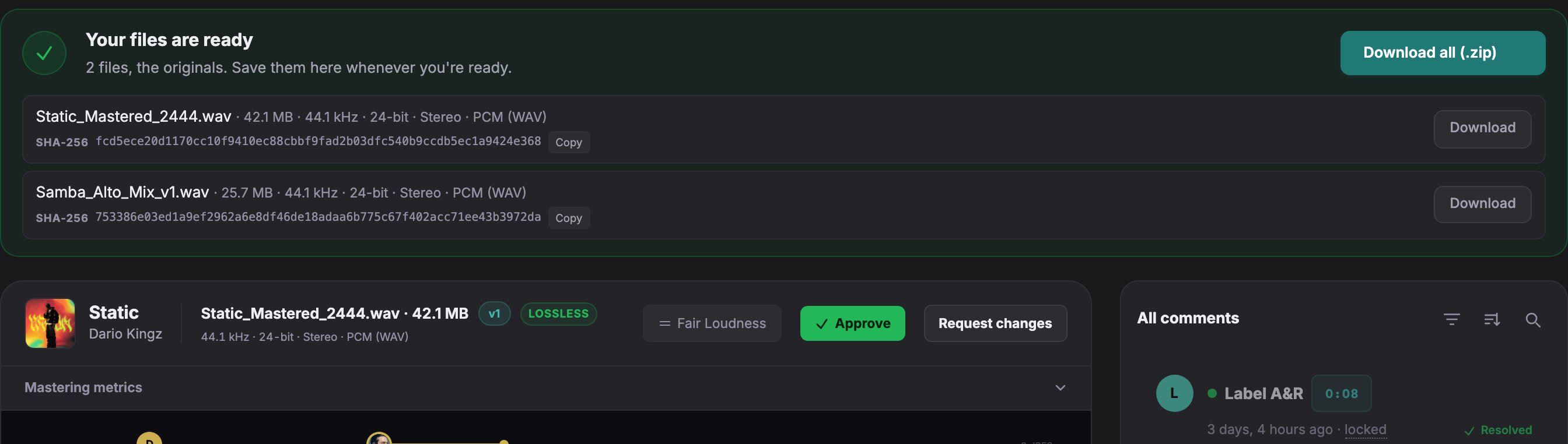
Open a live client page to try playback, comments and version comparison without an account.
Samply’s listening and payment features
Samply offers a native iPhone app, gapless playback and loudness matching. Its payment settings can unlock downloads or access for one purchaser or for everyone with the link. Check those settings against the way you bill and deliver work.
Approval and file checks in Soneam
Soneam records approval of a selected version and provides a printable record. The name and email are supplied by the reviewer. Delivery checksums identify file bytes; they do not establish identity or guarantee that a later revision is approved.
Choosing a review workflow
Try the same listening and delivery steps in each product. Gapless album playback and native mobile access may be important to your clients. If you need version approval records and streaming loudness previews in the review, check those in Soneam’s client demo.
Review and delivery options
- Voice notes and attachments. Clients can record a note in the browser or attach a file to a comment.
- Internal notes. Keep working notes off the client page.
- Client uploads. Use an upload link to receive reference files or zipped sessions, up to 50 GB a file.
- Branding. Add your logo and accent color to the client page.
- Delivery files. Include masters, stems, zipped DDPs and PDFs in the same delivery.
Playback, comments, approval and delivery are included on Free. Branding requires Pro or above. See plans and included features.
Keep existing review links available
Try Soneam with a copy of one master and one revision. Existing Samply links and discussion stay in Samply; copying audio does not move those records. Send the new link to the client only when you have agreed where the next review will happen.
Free: up to 3 versions per track. Pro and above: unlimited versions within your storage allowance. Existing versions, comments, approvals and deliveries remain available. The limit applies when adding a version, including on existing projects.

Frequently asked questions
Is Soneam a good Samply alternative?
Soneam is an option if you need version approval records, loudness previews and file delivery on the review link. Samply also supports payment-controlled downloads; compare the client experience and the settings you need in both products.
What does Samply do better than Soneam?
Samply offers a native iPhone app and gapless playback across tracks. These can be useful for mobile listening and album sequencing. Soneam uses a browser and plays tracks individually.
Which Soneam features should I try?
Soneam includes printable version approval records, streaming loudness and codec previews, and SHA-256 checksums on delivery. Check Samply’s current documentation for the corresponding features; payment-controlled downloads are available in Samply too.

Try a master review in Soneam
Open the client demo, then use the Free plan to test a review and delivery with your own file.