
Soneam vs EngineEars: booking, payment and delivery
Compare EngineEars booking and escrow with Soneam’s client review, approval and file delivery workflow.
EngineEars combines a marketplace with booking and payment management. Soneam handles audio review and delivery for clients you already work with. The payment models differ as well as the feature sets.
Booking work and reviewing existing work
If you need a bookable profile, scheduling and escrow, keep those requirements in EngineEars: Soneam does not replace them. Soneam is an option for engineers who already have clients and arrange bookings themselves, but need a place to review revisions and deliver the accepted audio. A download lock holds files back; it does not secure a booking fee.
At a glance
| Soneam | EngineEars | |
|---|---|---|
| What it is | Review, approval and delivery for clients you already have | A marketplace and business platform for engineers and studios |
| Public booking profile | No | Yes: public bookable profile |
| Free tier | Yes: 5 GB and 1 GB of your own uploads a month, unlimited projects, up to 3 versions per track, 0% fee | Yes: bookable profile, 15% fee on earnings |
| Platform fee on what you charge | 0% on every plan | 15% free tier · 0% on Platinum ($15/mo) |
| Who holds the money | Your connected Stripe account | Escrow from booking, paid out 24h after approval |
| Fee secured before you start work | No: the gate holds the files, not the fee | Yes, according to its escrow description |
| Lossless playback and delivery | Yes (FLAC streaming, originals on delivery) | Yes (WAV, AIFF, multitrack stems) |
| Time-stamped comments on the waveform | Yes | Yes |
| Streaming loudness and codec preview | Yes | Not documented in sources checked |
| LUFS and true-peak metering | Yes | Not documented in sources checked |
| Checksum on delivery (SHA-256) | Yes | Not documented in sources checked |
| The client side | A link · no account, no app | An artist account with a wallet and CRM |
| Scheduling, CRM, intake forms | No | Yes |
| Verified credits, watermarking, 1099s | No | Yes (credits via Muso.AI, US 1099s) |
| Storage | 5 GB free, 500 GB or 1 TB paid | Unlimited on Platinum |
| Headline pricing | Free / $10 / $20 ($8 / $16 billed yearly) / Enterprise on request | $0 with 15% fee, or $15/mo billed annually at 0% |
Use the linked product documentation to confirm plan details. “Not documented” means the sources checked did not establish the feature; it does not prove the product lacks it. Sources: EngineEars for engineers and plans.
What your client actually sees
A Soneam client receives a review link. They can listen and approve without an account, and download the released files once any payment requirement is satisfied.
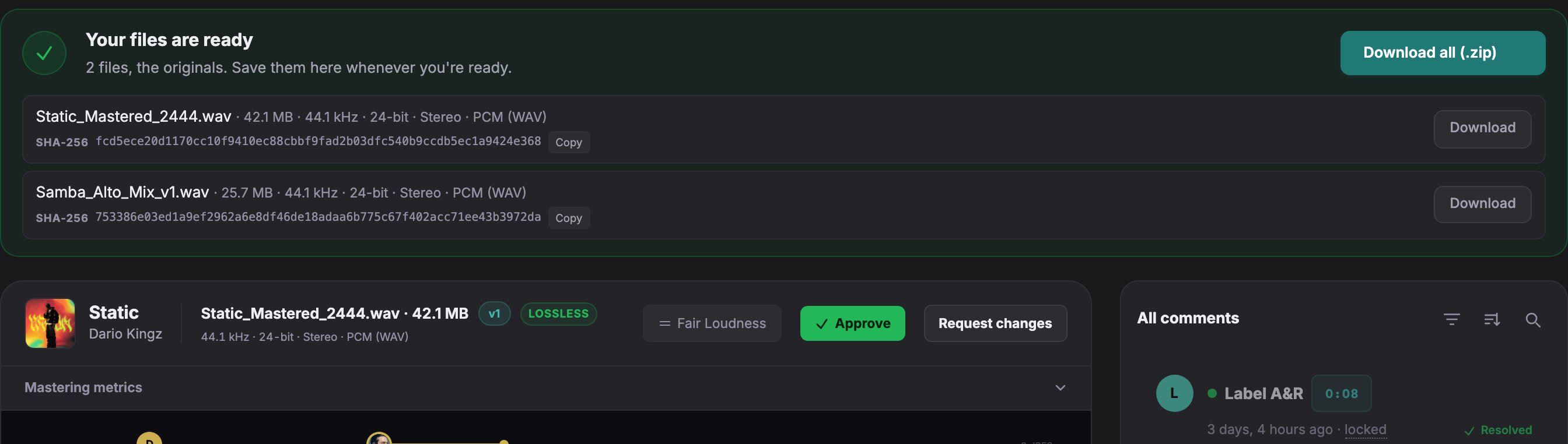
Open a live client page to try playback, comments and version comparison without an account.
Booking and escrow
EngineEars describes a booking process with funds held in escrow and released after approval. This is different from a download restriction. Soneam does not hold a booking deposit in escrow or provide a marketplace.
Receiving payment in Soneam
Card payments on Pro and above use your connected Stripe account. For a bank transfer or another external method, verify receipt before marking the delivery as paid. Soneam charges no transaction fee; payment processing fees apply. A locked download does not guarantee payment or prevent recording of playback.
Choosing the service you need
Consider EngineEars if you need a public booking profile and business tools around the job. Consider Soneam for comments, version approval, loudness previews and file delivery. If you use more than one service, check their terms and agree where the client will review, pay and download.
Tools for existing client projects
- Free review and delivery. Free includes 5 GB, 1 GB of your own uploads a month and up to 3 versions per track. Pro adds unlimited versions within its storage allowance, branding and Visits; Studio adds webhooks. Projects are unlimited on every plan.
- Client comments. Collect text, voice notes and attachments on the waveform.
- Internal notes. Keep reminders off the client page.
- Version approval. Retain the supplied reviewer details and selected version.
- File delivery. Include supporting files up to 50 GB each, within your storage allowance.
Plans differ in storage and additional features. See plans and included features.
Keep booking and delivery responsibilities clear
Moving an audio review does not move a booking, escrow balance or agreement. Check the booking service’s terms before using another review tool. Tell the client which service they will use to review, approve and pay.
Free: up to 3 versions per track. Pro and above: unlimited versions within your storage allowance. Existing versions, comments, approvals and deliveries remain available. The limit applies when adding a version, including on existing projects.

Frequently asked questions
Is Soneam a good EngineEars alternative?
It covers a different part of the job. EngineEars includes booking and escrow. Soneam handles client review, approval and delivery, with card payment through your Stripe account or manual confirmation of external payments.
What does EngineEars do better than Soneam?
EngineEars includes a marketplace, booking, escrow and business tools such as scheduling and CRM. Soneam does not provide a marketplace or escrow.
How do Soneam and EngineEars prices compare?
EngineEars lists Provider Essentials at $0 with a 15% fee and Provider Platinum at $15 per month billed annually with a 0% platform fee. Soneam offers Free, Pro at $10/month and Studio at $20/month ($8 and $16 billed yearly), with Enterprise on request. Soneam charges no transaction fee. Payment processing fees are separate.

Set up a client review
Share a file, collect feedback and check the approval and delivery steps. The Free plan includes playback, comments, approval, delivery, 5 GB, 1 GB of your own uploads a month and up to 3 versions per track.